Podcast to Ebook: Transcripts to a Guide
If you have spoken it, you can publish it. Here is how to turn podcast, YouTube or webinar transcripts into an ebook that reads like a book, not a transcript.
By Shri and Sarath · 7 min read · Updated 11 October 2026 · Facts checked 11 October 2026
A podcast archive is a lot of material you have already created, and most of it is heard once. An ebook puts the best of it in front of people who don't listen to podcasts, gives listeners something to keep, and can work as a lead magnet or a product built from recordings you were making anyway.
The same applies to YouTube channels, webinar libraries and workshop recordings. The job is not to transcribe and format. It is to extract the teaching and rebuild it as prose.
What a transcript is good for
Spoken content has strengths a blank page lacks: it is in your voice, it has stories and asides, and it answers questions real people asked. It also has weaknesses. It meanders, repeats itself, points at things the listener could hear or see, and a single episode rarely has a book's structure.
Step 1: Choose the episodes
Not every episode belongs in a book. Pick by purpose. These lengths are rough starting points:
Lead magnet
- Episodes to pick
- One solo episode or one strong interview on a single topic
- Rough length
- 3,000 to 6,000 words
How-to guide
- Episodes to pick
- Three to six episodes that cover a process end to end
- Rough length
- 10,000 to 20,000 words
Series companion
- Episodes to pick
- A season, or a run of episodes on one theme
- Rough length
- 20,000 words or more
Solo and teaching episodes are the easiest source. Interviews work when the guest's answers are substantial and you have their permission to publish their words in a book. Ask; credit them clearly.
Step 2: Get clean-enough transcripts
SuperEbook reads TXT, Markdown, PDF, DOCX, SRT, VTT files as text. It does not take audio or video, so every recording has to be transcribed first. Your options:
- YouTube. For your own videos, YouTube Studio lets you download subtitles: open Subtitles, pick the video, choose Edit for the language, then Options and Download subtitles. YouTube's page doesn't state the file formats or any limits for automatic captions, so check the result before relying on it.
- Your podcast host. Some hosts offer transcripts; check yours.
- A transcription service. Any service that gives you text will do. Compare their current prices and accuracy on their own pages, since both change and vary with audio quality.
Keep speaker labels if there is more than one voice. Save one file per episode, named by number and topic. Don't clean the transcripts by hand; hours of filler-removal is not the best use of your time. But skim each one for misheard names and technical terms, which are where automatic transcripts tend to slip.
Step 3: Per-episode or rebuilt structure
Per-episode structure. Each episode becomes a chapter, in order. It is fast and keeps the show's narrative. It suits a companion where listeners want the book to mirror the show.
Rebuilt structure. You outline the book the way a reader needs it, then draw material from across episodes into each chapter. It takes longer to plan and is usually better as a standalone product, because a podcast is recorded in the order you thought of things, not the order a learner needs them.
For a lead magnet from a single episode the choice doesn't arise: outline that episode's teaching into five or six chapters and go.
Step 4: Write chapters from the transcripts
Planning in SuperEbook is free: three title options, a brief and an editable chapter outline, with nothing written until you press Write. When you do, each chapter is written from the passages of your uploaded transcripts that fit it, to the plan you approved, and the text appears as it arrives. A lead magnet costs 25 credits and a how-to guide 35 credits; the 50 free credits a new account starts with cover ≈ 2 lead magnets or 1 how-to guide.
Whatever tool you use, the rewrite should do four things to the spoken material:
- Remove filler, false starts and audio references like 'as I said at the top of the show'.
- Keep the stories, examples and opinions. They are your voice.
- Turn a rambling answer into a sequence: claim, reason, example, action.
- Add the signposting a reader needs (headings, transitions) that a listener didn't.
Then check it. The tool can add things that were never said, so pick five paragraphs at random and find where in your transcripts each idea came from. Anything you can't find is an addition: verify it or cut it. Here is a real draft written from a one-line idea, unedited, as a reference for what a starting point looks like:
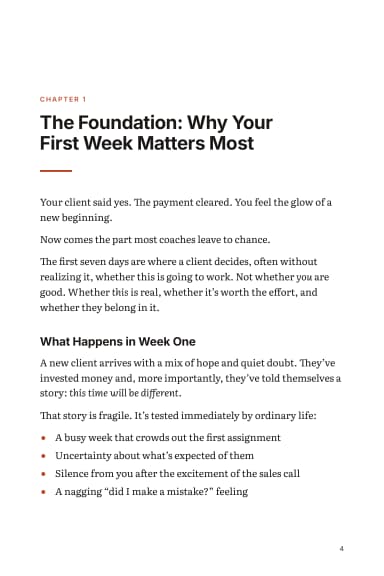
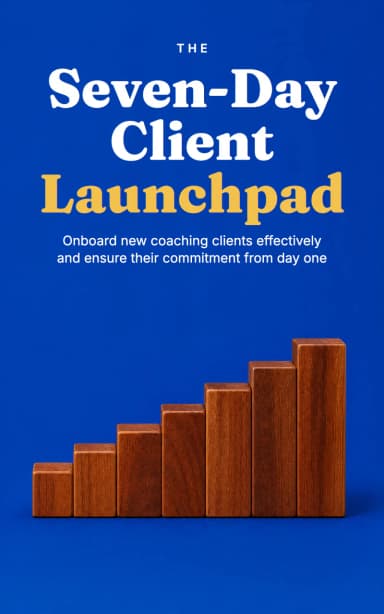
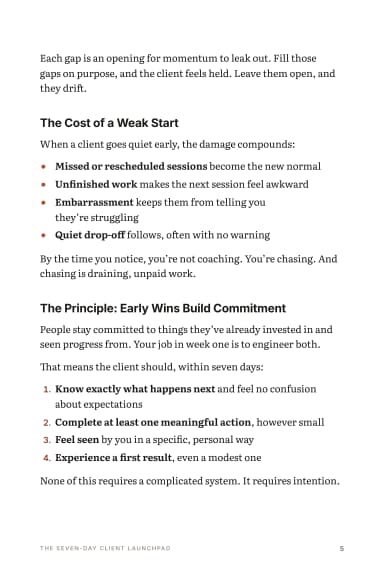
For: Grow my email list
Lead Magnet · 27 pages
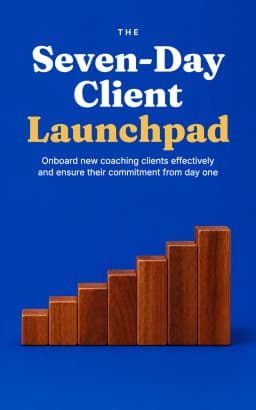
The Seven-Day Client Launchpad
From a one-line idea: A first-week plan for new coaching clients: what to send, ask and set up in the first seven days so they show up, do the work and stay
Written by Claude Sonnet 5.5 in 2.3 minutes, unedited · 3,751 words · 25 credits to write
A sample transformation
An illustration, written for this guide rather than taken from a real transcript or from our output. Spoken:
Written, as the chapter should read:
Same idea, same voice, fewer words, no audio references. That is the whole transformation, repeated across a chapter.
Step 5: Edit for someone who has never heard the show
- Define every term and name on first use. Listeners know your co-host; readers don't.
- Replace 'listen to episode 12' with the content or a short summary.
- Where a video had a visual, describe it or add a simple diagram.
- Cut sponsor reads and intros entirely.
- Add a short introduction in your own words about why these episodes became a book.
- Credit guests and link to the episodes. It also sends readers back to the show.
Typing edits in the editor is free. A rewrite of a selected passage by the AI costs credits.
Step 6: Pick the format and the channel
SuperEbook exports PDF, EPUB and DOCX, with a cover you choose from six options, full commercial rights and no watermark. Downloads need a paid plan or a credit pack bought from the book's page. Where it goes is up to you: a lead magnet linked from show notes, a guide sold on your own site, or a longer title on Amazon KDP, which accepts EPUB and Word (DOC/DOCX) manuscripts. KDP's help page recommends validating an EPUB in Kindle Previewer before upload.
Rights and disclosure
Guest words are a separate matter: ask their permission for book use even if the episode is public, and send them their chapter before you publish. Not legal advice; ask a lawyer if the stakes are high.
On KDP, if an AI tool generated the text, you must tell KDP when you publish, even if you edited it afterwards. Work you wrote yourself that AI only helped you edit or refine counts as AI-assisted and doesn't need disclosing. A book whose chapters were written by AI from your transcripts is AI-generated, so disclose it. Check KDP's current content guidelines before you publish.
Interviews need two extra decisions
Whose book is it? If the guest supplied most of the insight, the honest shape is 'what I learned from X' with heavy quotation and credit, or a compilation where each chapter is a guest. Where is your contribution? Add a synthesis: what the guests agree on, where they differ, what you recommend. Without it, the book is an anthology of transcripts.
To work out what your word count means in pages, use the word count to pages converter.
Do this now
- Pick one solo episode with a clear teaching.
- Get its transcript as text (YouTube Studio download, your host, or a transcription service).
- Skim it for misheard names; don't hand-clean it.
- Approve a five-or-six-chapter outline built from the episode's teaching.
- Write from the transcript, then check five paragraphs against the source.
- Edit for someone who has never heard the show.
- Export, and put the link in the episode's show notes.
Write it from your own material.
Plan a book free and see the outline before you spend a credit.
Try SuperEbook free